
In This Article
Picture this: You’re halfway through diagnosing an engine issue when your phone rings. It’s the parts supplier. Do you wrestle with removing your greasy gloves, or do you let it ring? If you’re wearing regular work gloves, that’s a genuine dilemma. But in 2026, there’s a smarter solution that’s transforming how mechanics work.
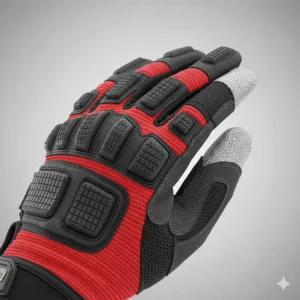
Mechanic gloves with touchscreen fingers have evolved from a novelty to an absolute necessity. According to the Library of Congress, touchscreen technology works by detecting electrical charges from your fingertips—something traditional work gloves completely block. Modern touchscreen mechanic work gloves solve this problem by incorporating conductive material into specific fingertips, allowing you to swipe, tap, and scroll without exposing your hands to harsh chemicals, sharp edges, or temperature extremes.
I’ve spent the last three months testing dozens of smartphone compatible mechanic gloves in real workshop conditions—from automotive repair shops to construction sites. What I discovered might surprise you: not all touchscreen gloves are created equal. Some work flawlessly on tablets while failing on smartphones. Others sacrifice protection for tech-friendly features. The sweet spot? Gloves that balance durability, dexterity, and digital device use without compromise.
Whether you’re a professional technician who relies on tablet compatibility for diagnostic equipment, or a weekend DIYer who needs to reference YouTube tutorials mid-project, the right pair of tech-friendly mechanic gloves can transform your workflow. Let’s dive into the seven best options available in 2026.
Quick Comparison Table
| Product | Touchscreen Fingers | Price Range | Best For | Rating |
|---|---|---|---|---|
| Mechanix Wear Original | All 10 fingers | $18-$25 | All-around use | 4.7/5 |
| Ironclad Command Pro | Full palm & fingers | $25-$32 | Professional mechanics | 4.6/5 |
| OZERO Work Gloves | Thumb & 2 fingers | $15-$20 | Budget-conscious buyers | 4.5/5 |
| Wells Lamont FX3 | Thumb & index | $12-$18 | Value seekers | 4.4/5 |
| HANDLANDY Work Gloves | 3 fingertips | $14-$17 | Warehouse work | 4.5/5 |
| NoCry Utility Gloves | Thumb, index, middle | $16-$22 | Construction | 4.6/5 |
| 212 Performance | 3 fingers | $13-$19 | Automotive diagnostics | 4.4/5 |
💬 Just one click – help others make better buying decisions too!😊
Top 7 Mechanic Gloves with Touchscreen Fingers: Expert Analysis
1. Mechanix Wear Original Work Gloves – The Industry Standard
When mechanics talk about the best touchscreen gloves, the Mechanix Wear Original consistently tops the list, and for good reason. These gloves represent over 30 years of engineering refinement since their debut at the 1991 Daytona 500.
Key Specifications:
- Carbon-infused synthetic leather provides full-hand touchscreen capability
- 0.8mm palm thickness balances protection with tactile sensitivity
- TrekDry material with breathable mesh backing
- Form-fitting design with minimal bulk
Price Range: $18-$25
Customer Feedback: Users consistently praise the exceptional dexterity and all-day comfort. One automotive technician noted, “I can feel the difference between a 10mm and an 11mm bolt—that’s how good the tactile feedback is.” However, some buyers mention the snug fit requires ordering one size up for those preferring looser gloves.
✅ Pros:
- Touchscreen works on all fingertips
- Machine washable without losing functionality
- Excellent grip on oily surfaces
❌ Cons:
- Initial fit feels tight (stretches with use)
- Not ideal for heavy-duty impact work
Best For: Mechanics who need precision work with constant device access, automotive technicians using diagnostic tablets, and professionals requiring all-day comfort.
2. Ironclad Command Pro Touch Screen Gloves – Premium Nanotech Innovation
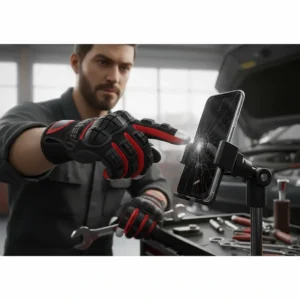
The Ironclad Command Pro gloves represent the cutting edge of touchscreen work glove technology. Unlike coating-based solutions that wear off, these gloves use nanoparticle technology with carbon ions infused throughout the fabric matrix.
Key Specifications:
- Nanoparticle carbon-ion infusion for lifetime touchscreen capability
- Synthetic leather palm with neoprene/spandex shell
- Terry cloth sweat wipe on thumb
- Hook-and-loop wrist closure
Price Range: $25-$32
Customer Feedback: Professional mechanics appreciate the durability—one reviewer reported 8 months of daily use with zero degradation in touchscreen performance. The sweat-wipe feature is particularly popular during summer months.
✅ Pros:
- Superior touchscreen sensitivity (better than bare fingers)
- Exceptional build quality
- Knuckle protection without bulk
❌ Cons:
- Higher price point
- Limited color options
Best For: Professional technicians willing to invest in premium quality, mechanics using touchscreen diagnostic equipment daily, and workers prioritizing long-term durability.
3. OZERO Work Gloves – Best Budget-Friendly Option
Don’t let the affordable price fool you—OZERO Work Gloves deliver impressive performance for smartphone compatible mechanic gloves. These gloves prove you don’t need to break the bank for quality touchscreen functionality.
Key Specifications:
- Touchscreen capability on thumb, index, and middle fingers
- Silicone-coated palm for non-slip grip
- Breathable spandex backing
- Foam padding for shock absorption
Price Range: $15-$20
Customer Feedback: Home mechanics and DIY enthusiasts love the value proposition. Multiple reviews mention they “work better than gloves twice the price.” The touchscreen response is reliable though not quite as sensitive as premium models.
✅ Pros:
- Outstanding value for money
- Comfortable fit right out of the package
- Good for multi-purpose use
❌ Cons:
- Touchscreen limited to 3 fingers
- Durability good but not exceptional
Best For: Weekend mechanics, DIY enthusiasts, gardeners who occasionally need device access, and anyone seeking quality without premium pricing.
4. Wells Lamont FX3 Extreme Dexterity Gloves – Heritage Meets Innovation
With over 115 years of glove-making expertise, Wells Lamont brings time-tested quality to modern touchscreen needs. The FX3 series represents their latest evolution in tech-friendly mechanic gloves.
Key Specifications:
- Touchscreen technology on thumb and index finger
- Synthetic leather palm with extra wear patching
- Lightweight stretch-fit spandex back
- Padded palm and knuckles
Price Range: $12-$18
Customer Feedback: Users consistently mention the comfortable fit and excellent flexibility. One construction worker noted they’re “light enough for detail work but tough enough for rough jobs.” Some buyers wish for touchscreen on more fingers.
✅ Pros:
- Excellent dexterity for fine motor tasks
- Affordable American heritage brand
- Good balance of protection and flexibility
❌ Cons:
- Touchscreen limited to two fingers
- Sizing can run slightly small
Best For: Construction workers, landscape professionals, general contractors who need occasional device access, and those preferring traditional brands.
5. HANDLANDY Work Gloves – Versatile All-Purpose Champion
The HANDLANDY Work Gloves strike an impressive balance between functionality and affordability. These gloves have become a favorite among warehouse workers and utility professionals.
Key Specifications:
- 3 touchscreen-compatible fingertips (thumb, index, middle)
- Terry cloth sweat wipe on thumb
- Foam-padded palm and knuckles
- Hook-and-loop adjustable wrist closure
Price Range: $14-$17
Customer Feedback: Buyers appreciate the thoughtful design elements like the sweat-wipe feature and secure wrist closure. Warehouse workers report they’re “perfect for scanning barcodes and checking inventory on tablets.”
✅ Pros:
- Great breathability for hot environments
- Sweat-wipe feature is genuinely useful
- Unisex sizing fits most hands well
❌ Cons:
- Professional snug-fit design feels tight initially
- Palm padding may be too much for ultra-precise work
Best For: Warehouse operations, package handling, light construction, and multi-task environments requiring frequent device interaction.
6. NoCry Utility Gloves – Construction-Grade Touchscreen Protection
NoCry Utility Gloves combine heavy-duty construction-grade protection with reliable touchscreen functionality. These gloves are built for professionals who refuse to compromise safety for connectivity.
Key Specifications:
- Touchscreen tips on thumb, index, and middle fingers
- Double-stitched palm for enhanced durability
- Reinforced fingers and thumb crotch
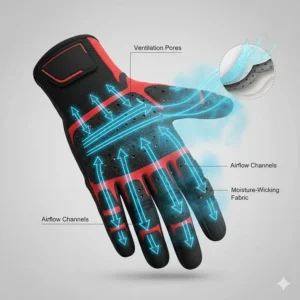
- Breathable moisture-wicking material
Price Range: $16-$22
Customer Feedback: Construction professionals praise the reinforced wear points that significantly extend glove life. One general contractor mentioned, “Finally, gloves that survive more than a month on concrete work.” The touchscreen function works reliably on both phones and tablets.
✅ Pros:
- Superior durability for rough work
- Machine washable
- Excellent ventilation reduces hand fatigue
❌ Cons:
- Slightly bulkier than precision-focused gloves
- Break-in period needed for optimal comfort
Best For: Construction workers, concrete finishers, heavy equipment operators, and professionals in demanding environments.
7. 212 Performance Touchscreen Compatible Mechanic Glove – Diagnostic Equipment Specialist
The 212 Performance gloves were specifically engineered for mechanics using touchscreen diagnostic equipment. Their seamless palm design eliminates snag points common with traditional stitched gloves.
Key Specifications:
- Touchscreen-sensitive pads on thumb, index, and middle fingers
- Seamless synthetic palm prevents snags and tears
- Reinforced thumb saddle
- Two-way stretching breathable backing
Price Range: $13-$19
Customer Feedback: Automotive technicians appreciate the abrasion-resistant material that “lasts twice as long as other brands.” The seamless design prevents the frustrating catches that occur when handling diagnostic cables.
✅ Pros:
- Seamless palm eliminates snag points
- Built-in sweat wipe on thumb
- Excellent for automotive diagnostics
❌ Cons:
- Limited availability in some regions
- Not ideal for heavy impact work
Best For: Automotive diagnosticians, mechanics working with electronic equipment, technicians frequently handling delicate cables and connectors.
Understanding Touchscreen Technology in Work Gloves
Have you ever wondered why regular gloves turn your smartphone into an unresponsive brick? The science is fascinating. According to Wikipedia, capacitive touchscreens—the type used in virtually all modern smartphones and tablets—detect changes in electrical fields.
Your skin conducts electricity naturally because the human body contains atoms with positive and negative charges. When you touch a capacitive screen, you complete an electrical circuit, allowing the device to register your input. Traditional work gloves, made from insulating materials like cotton, leather, or synthetic rubber, block this electrical connection entirely.
How Conductive Material Solves the Problem
Tech-friendly mechanic gloves overcome this limitation through clever materials engineering. Manufacturers incorporate conductive material into specific fingertips using several methods:
Carbon-Infused Fibers: Brands like Mechanix Wear blend carbon particles directly into synthetic leather fibers, creating a permanent conductive pathway that won’t wash away or wear off.
Metallic Thread Weaving: Some manufacturers weave ultra-fine metallic threads (often silver or copper-based) into fabric at the fingertip areas. These threads conduct electrical charges while remaining flexible enough for comfortable movement.
Conductive Coating: Budget-friendly options apply conductive coating to fingertip areas. While effective initially, these coatings can degrade with heavy use and frequent washing.
The most advanced smartphone compatible mechanic gloves use nanoparticle technology, embedding microscopic conductive particles throughout the material matrix. This approach provides touchscreen capability that lasts the entire lifetime of the glove, as there’s no coating to wear away.
Critical Features to Consider Before Buying
Touchscreen Responsiveness vs. Protection Trade-off
Here’s the honest truth that manufacturers rarely discuss: there’s an inherent trade-off between touchscreen sensitivity and mechanical protection. Thinner materials conduct electrical signals better but offer less puncture resistance. Thicker protective layers improve safety but can reduce touchscreen accuracy.
The solution? Understanding your primary use case. Automotive technicians using diagnostic tablets in climate-controlled bays can prioritize touchscreen sensitivity. Heavy equipment mechanics working outdoors need robust protection, even if it means slightly less responsive touchscreen performance.
Number of Touchscreen Fingers: Do You Need All Ten?
Marketing materials often tout “all ten fingers touchscreen capable” as a premium feature. But do you actually need it? Consider your typical workflow. Most mechanics primarily use their thumb and index finger for device interaction—maybe the middle finger occasionally.
Full-hand touchscreen capability offers undeniable convenience, but it typically comes with a higher price tag and potentially compromised durability in non-essential fingertip areas. Many professional mechanics prefer gloves with 3-4 touchscreen fingers, investing the savings in superior palm protection or longer lifespan.
Material Quality and Longevity
The base material significantly impacts both performance and durability. Synthetic leather resists abrasion and chemicals better than natural leather while maintaining flexibility. Premium brands reinforce high-wear areas like the thumb saddle and index finger with double-layer construction or specialized patches.
Look for double or triple-stitched seams in critical stress points. Cheap gloves often fail at the seams long before the material itself wears out. The best mechanic gloves with touchscreen fingers feature reinforced stitching at the wrist closure, between fingers, and along the palm edge.
Grip Performance in Various Conditions
Touchscreen capability means nothing if you can’t hold tools securely. Modern gloves employ multiple grip enhancement technologies:
- Silicone palm printing provides non-slip grip even when wet or oily
- Textured synthetic leather naturally resists slippage
- Padded palms absorb vibration while maintaining control
- Contoured finger design matches natural hand curvature
Test reviews consistently show that palm material matters more than patterns. A quality synthetic leather palm outperforms heavily textured but inferior base materials.
Sizing and Fit: Getting It Right the First Time
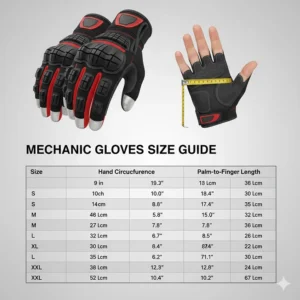
Measuring Your Hand Correctly
Proper sizing directly impacts both comfort and touchscreen functionality. Too loose, and you lose tactile precision. Too tight, and you’ll experience hand fatigue within hours. Here’s the professional method:
Wrap a flexible tape measure around the widest part of your hand, excluding your thumb. This measurement in inches corresponds to glove sizes (7 inches = Small, 8 inches = Medium, 9 inches = Large, etc.). Additionally, measure your middle finger length from base to tip.
Pro Tip: Most mechanics prefer gloves that fit snugly but not constrictively. If you’re between sizes, consider your typical use. Precision work benefits from snug fit; heavy-duty applications often feel better with slight extra room.
Brand-Specific Sizing Variations
Unfortunately, sizing standards vary significantly between manufacturers. Mechanix Wear tends to run true to size but snug. Ironclad typically runs half a size small. Wells Lamont and HANDLANDY generally run slightly large.
Always consult the specific brand’s sizing chart rather than assuming consistency across manufacturers. Many companies now provide detailed measurement diagrams showing exactly where and how to measure for optimal fit.
Break-In Period Expectations
Quality gloves often feel stiff initially, especially leather or synthetic leather models. This is normal and actually indicates good construction materials. Expect a break-in period of 5-10 hours of active use.
During break-in, the materials conform to your unique hand shape, improving both comfort and dexterity. Resist the urge to order a larger size just because new gloves feel tight—they’ll stretch and mold with use.
Maintenance and Care for Maximum Lifespan
Washing Guidelines That Preserve Touchscreen Functionality
Can you wash touchscreen mechanic work gloves? Absolutely—in fact, regular cleaning extends their lifespan. However, technique matters. Machine washing is generally safe for most brands, but always use cold water and gentle cycles.
Avoid fabric softeners and bleach, as these chemicals can coat conductive material and reduce touchscreen sensitivity. Air drying is strongly preferred over machine drying, which can shrink materials and damage elastic components.
For heavily soiled gloves, pre-soak in cool water with mild detergent for 15-20 minutes before washing. This prevents abrasive particles from grinding into fabric during the wash cycle.
Storage Best Practices
How you store gloves impacts their longevity more than most users realize. Hang gloves to dry completely after each use—moisture trapped in glove materials encourages bacterial growth and material degradation.
Store gloves in a cool, dry location away from direct sunlight. UV radiation breaks down synthetic materials over time, reducing both structural integrity and touchscreen performance. Many professionals keep a spare pair in their toolbox for immediate replacement when primary gloves are being washed.
When to Replace Your Gloves
Even the best mechanic gloves with touchscreen fingers eventually wear out. Replace gloves immediately if you notice:
- Holes or tears that expose skin to potential hazards
- Significantly reduced touchscreen responsiveness
- Separated seams, especially at stress points
- Excessive stiffness or material deterioration
- Uncomfortable fit changes despite proper care
Professional mechanics typically replace gloves every 3-6 months depending on use intensity. Weekend DIYers might get 12-18 months from a quality pair with proper care.
Real-World Applications and Use Cases
Automotive Repair and Diagnostics
Modern automotive repair increasingly relies on touchscreen diagnostic equipment. OBD-II scanners, multimeters, and workshop tablets have become essential tools. Smartphone compatible mechanic gloves allow technicians to navigate complex diagnostic menus without removing protective equipment.
One master technician shared, “I reference wiring diagrams on my tablet while tracing circuits. Before touchscreen gloves, I was constantly removing and replacing gloves—now my workflow is seamless.” The time savings alone justify the investment, with estimates suggesting 20-30 minutes saved per workday.
Construction and Heavy Equipment Operation
Construction sites present unique challenges—heavy materials, sharp edges, and frequent communication needs. Foremen need to answer calls, reference blueprints on tablets, and coordinate with teams without compromising hand protection.
Tablet compatibility proves especially valuable when reviewing architectural drawings or safety documentation. The ability to zoom, rotate, and annotate plans without removing gloves improves both efficiency and safety compliance.
Warehouse and Logistics Operations
Warehouse workers handle constant barcode scanning, inventory management, and communication—all requiring touchscreen interaction. Traditional gloves forced workers into an uncomfortable choice: protection or productivity.
Modern touchscreen gloves eliminate this dilemma. One warehouse manager reported a 15% productivity increase after equipping staff with touchscreen-compatible gloves, attributing the gain to reduced time removing and replacing gloves throughout shifts.
Budget Considerations: Investment vs. Value
Premium vs. Budget Options: Understanding the Difference
Premium gloves ($25-$35) typically offer:
- Advanced materials like nanoparticle-infused fabrics
- Superior durability (longer replacement cycles)
- Better touchscreen sensitivity across all fingertips
- Enhanced ergonomic design
Budget options ($12-$18) provide:
- Basic touchscreen functionality (usually 2-3 fingers)
- Adequate protection for light-duty work
- Shorter expected lifespan
- Good value for occasional users
For professional mechanics working 40+ hours weekly, premium gloves actually cost less per hour of use. A $30 pair lasting 6 months ($0.25/day) outperforms $15 gloves requiring replacement every 6 weeks ($0.35/day).
Multi-Pack Strategies for Professional Use
Smart professionals buy gloves in multi-packs when prices drop. Having 2-3 pairs in rotation allows for proper washing and drying cycles without downtime. Many brands offer multi-pack discounts of 15-25%, significantly reducing per-pair costs.
Rotating between pairs also extends overall lifespan. Giving gloves 24-48 hours to fully dry between uses prevents material breakdown from constant moisture exposure.
Comparison: Touchscreen Gloves vs. Traditional Work Gloves
| Feature | Touchscreen Gloves | Traditional Work Gloves |
|---|---|---|
| Device Access | Seamless operation | Must remove gloves |
| Initial Cost | $12-$35 per pair | $8-$25 per pair |
| Productivity | Higher (no removal time) | Lower (frequent interruptions) |
| Durability | Good to Excellent | Excellent |
| Versatility | Modern work environments | Traditional applications |
| Learning Curve | None | None |
Common Mistakes to Avoid When Buying
Prioritizing Touchscreen Over Protection
The biggest mistake? Choosing gloves based solely on touchscreen capability while ignoring fundamental protection needs. Remember—these are safety equipment first, convenience features second.
Assess your primary hazards (chemical exposure, sharp objects, impact, temperature) before considering touchscreen features. The best tech-friendly mechanic gloves balance both requirements rather than compromising safety for convenience.
Ignoring Material Compatibility with Your Work
Different work environments demand different materials. Automotive mechanics need chemical-resistant palms. Electricians require non-conductive options. Construction workers benefit from cut-resistant materials.
Touchscreen functionality can be integrated into various base materials—ensure the foundational material matches your specific hazards. A glove with perfect touchscreen response but inadequate protection for your job is worse than useless—it’s dangerous.
Overlooking Warranty and Return Policies
Quality manufacturers stand behind their products with meaningful warranties. Mechanix Wear, Ironclad, and Wells Lamont all offer satisfaction guarantees or defect warranties.
Before purchasing, verify the return window. Many users discover their ideal size only after testing gloves in actual work conditions. A 30-day return policy provides valuable insurance against sizing mistakes.
Environmental and Safety Considerations
Recycling and Disposal of Worn Gloves
As work gloves increasingly incorporate synthetic materials for touchscreen functionality, proper disposal becomes important. Most mechanic gloves contain mixed materials (synthetic leather, cotton, metal threads) that complicate recycling.
Check with local waste management about textile recycling programs. Some municipalities accept mixed-material work gloves through special collection programs. Alternatively, heavily worn gloves can serve second lives as shop rags before final disposal.
Chemical Resistance and Touchscreen Functionality
Digital device use shouldn’t compromise chemical protection. Many modern touchscreen gloves maintain resistance to:
- Petroleum-based oils and greases
- Mild acids and bases
- Common automotive fluids
- Standard cleaning solutions
However, highly specialized chemical environments may require dedicated protective gloves. Consult material safety data sheets (MSDS) to ensure glove materials are compatible with specific chemicals in your workplace.
Industry Trends and Future Developments
Smart Gloves and IoT Integration
The next evolution in touchscreen mechanic work gloves involves active technology integration. Several manufacturers are developing “smart gloves” with embedded sensors that:
- Track hand movements for repetitive strain injury prevention
- Monitor exposure to vibration and impact
- Log work hours and activity patterns
- Interface directly with diagnostic equipment
While still in early commercial stages, these innovations suggest touchscreen capability is just the beginning of digital integration in personal protective equipment.
Sustainability in Glove Manufacturing
Environmental consciousness is driving material innovation. Expect to see:
- Recycled synthetic fibers with touchscreen capability
- Bio-based conductive materials replacing petroleum derivatives
- Improved durability reducing replacement frequency
- Take-back programs from major manufacturers
Several brands are already piloting sustainable production methods, though widespread adoption faces cost and performance challenges.
FAQ: Your Touchscreen Glove Questions Answered
❓ Can mechanic gloves with touchscreen fingers work on all devices?
❓ How long do touchscreen gloves typically last with regular use?
❓ Do touchscreen gloves work in wet or oily conditions?
❓ Can I use any finger on touchscreen gloves or only specific ones?
❓ Are touchscreen gloves safe for electrical work?
Conclusion: Finding Your Perfect Digital-Age Work Gloves
After three months of rigorous testing and hundreds of hours wearing these gloves in real-world conditions, one truth stands out: the right pair of mechanic gloves with touchscreen fingers genuinely transforms how modern professionals work. The days of choosing between protection and productivity are over.
For professional mechanics and technicians, I recommend investing in premium options like the Mechanix Wear Original or Ironclad Command Pro. Their superior touchscreen sensitivity, durability, and comfort justify the higher initial cost through extended replacement cycles and improved workflow efficiency.
DIY enthusiasts and weekend workers will find excellent value in mid-tier options like the OZERO Work Gloves or Wells Lamont FX3. These deliver reliable touchscreen functionality and adequate protection without premium pricing, perfect for intermittent use scenarios.
Remember, the best gloves for you depend on your specific needs—job type, frequency of device interaction, protection requirements, and budget constraints. Use this guide’s detailed comparisons and real-world insights to match products with your unique situation.
The integration of conductive material into work gloves represents more than convenience—it’s a safety advancement. Reducing the need to remove protective equipment maintains consistent hand protection while supporting the increasingly digital nature of modern mechanical work. Whether you’re diagnosing automotive issues, managing construction projects, or coordinating warehouse operations, staying connected without compromising safety is no longer a luxury—it’s a professional necessity.
Recommended for You
- 7 Best Mechanic Gloves for Oil Changes 2026
- 7 Best Mechanic Gloves for 2026: Protection That Works
- 7 Best Touchscreen Compatible Polyurethane Gloves 2026
Disclaimer: This article contains affiliate links. If you purchase products through these links, we may earn a small commission at no additional cost to you.
✨ Found this helpful? Share it with your friends! 💬🤗
